

Enterprises need to be created for each sector recorded with RPW.
You may have more than one enterprise per sector, for example you may have multiple crop varieties, have both commercial and pedigree herds / flocks, or perhaps 2 dairy herds with varying calving patterns. Creating your own enterprises allows you to personalise the tool to match the systems on your farm.
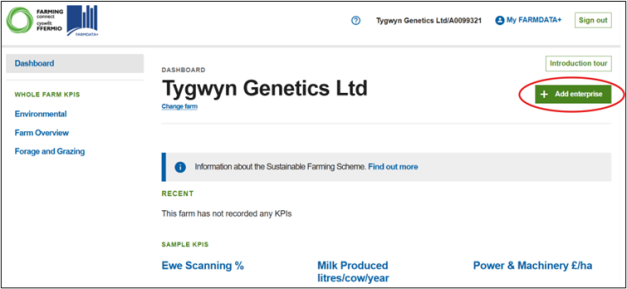
Once you have logged in and selected the CRN/Farm name that you wish to begin Benchmarking, you can create enterprises by clicking the ‘+ Add Enterprise’ button on the Dashboard
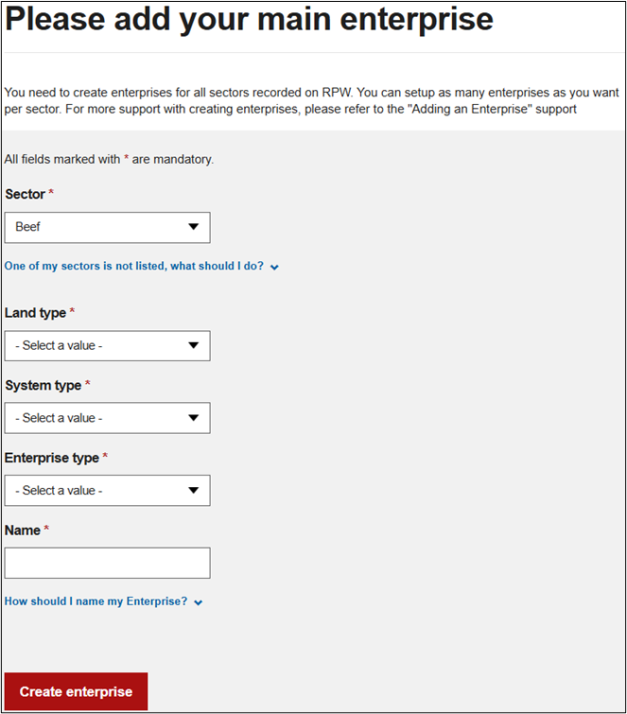
If a sector you require is not listed in bold in the dropdown menu, you will need to review the sectors you have selected in RPW Online.
Note – once you have added data to KPIs within an enterprise, you cannot edit or delete the enterprise and it will remain under the farm to allow multi-year comparisons of KPIs. You will however be able to rename the enterprise.
On setting up your enterprises, please consider each option that best matches your business.
Select a Sector for specific support:
An enterprise should be created for each different crop grown on the farm e.g. Winter Wheat, Spring Barley, or Potatoes.
- Select Arable from the sector list
- Select your System type
- Select your Enterprise type
- Select your Planting time if applicable
- Then Name the enterprise, choosing something that clearly indicates the enterprise e.g. Winter Wheat or Spring oats
Create as many enterprises that reflect your business. A Pedigree herd and a Commercial herd may be managed differently so it is sensible to create separate enterprises to allow for benchmarking individually.
- Select Beef from the sector list
- Select the Land type that is most appropriate to the specific enterprise
- Select the System type
- Select the Enterprise type
- For Sucklers and Stores, select the Breed type
For Sucklers and Beef Finishing, you will need to select the Finishing type and the Breed type
For Beef finishing, you will need to select the Finishing type and the Breed type (Breed selection is slightly different for this group of animals, as we have grouped the breeds that tend to be managed and perform similarly.
Choose the Breed type which is dominant in the herd, or setup a separate enterprise if the breeds are managed differently - Then name the enterprise, choosing something that clearly defines the enterprise e.g. Autumn Sucklers
Creating an enterprise that matches your business. If you have more than one herd that you manage separately, then you may wish to create more than one enterprise within the tool, so that you can benchmark them separately.
- Select Dairy from the sector list
- Select the Land type
- Select the System type
- Select the Enterprise type
- For Cows, Select the Calving type – if you do not have a tight block when calving, we suggest you class the herd as an AYR (all year round) calving herd
- Give each enterprise a suitable name, so that if you have more than one herd, you can easily differentiate between them e.g. AYR cows or Spring Calvers
More than one Horticulture enterprise can be created if required to benchmark your production according to the different options.
- Select Horticulture from the sector list
- Select the System type
- Select the Enterprise type
- Name the enterprise according to the setup selected, so that you can clearly identify each enterprise e.g. Edible veg box produce
More than one enterprise can be created in instances where multiple batches of Fattening Pigs are managed allowing each batch to be benchmarked independently.
- Select Pigs from the sector list
- Select the Enterprise type
- Select the Housing type
- Select the Breed type
- If you have Breeding Pigs, select the Weaning weight of piglets
- Name each enterprise a name that easily allows you to identify between the groups e.g. Fatteners start Feb-26 especially if you have more than one batch or herd of breeding pigs.
For specific support on setting up your Poultry enterprise follow this separate Poultry guide
More than one enterprise can be created if you have flocks managed differently. For example, if a Hill flock is managed separately to a pedigree flock on lowland ground, benchmarking these individually will allow you to view and analyse their performance separately.
- Select Sheep from the sector list
- Select the Land type that is most appropriate to the specific enterprise not the whole farm
- Select the System type
- Select the Enterprise Type
- For Breeding Ewes, select the Lamb sale type, the Breed type and the Average ewe weight
Choose the Breed type which is dominant in the flock, or setup a separate enterprise if the breeds are managed differently
For Purchased Lambs and Couples bought, select the Lamb sale type - Then name the enterprise, choosing something that clearly defines the enterprise e.g. Pedigree Ewes