

The Poultry sector in FARMDATA+ is set up differently to other Sectors and Whole Farm KPIs, as commercial poultry enterprises have flocks which come in for a set period of time either for Broilers or Layers.
Therefore, we have created the Poultry section to allow you to include start and end dates for each flock.
This setup allows you to compare flocks rather than compare your annual figures year-on-year, allowing you to improve from flock-to-flock.
Adding and Naming an Enterprise
In the first instance, you need to create your Poultry enterprise for either Broiler or Layer as outlined in the ‘Adding and Naming an Enterprise’ guide by clicking on the “+ Add Enterprise” button in the Dashboard.
You need to create an enterprise that matches your business. If you have a broiler and layer enterprise, you need to create an enterprise for each.
- Select Poultry from the sector list
- Choose an Enterprise type
- Select whether the flock is Free range or Not free range
- Select the Housing type
- Give each enterprise a suitable name, so that you can differentiate between them e.g. Layers multi-tier or Free-range Broilers
Setting up a Flock
If you have multiple sheds/flocks, you may wish to benchmark these individually - you can do this once the overarching Broiler or Layer enterprise has been created.
You will be prompted to setup a new flock as below.
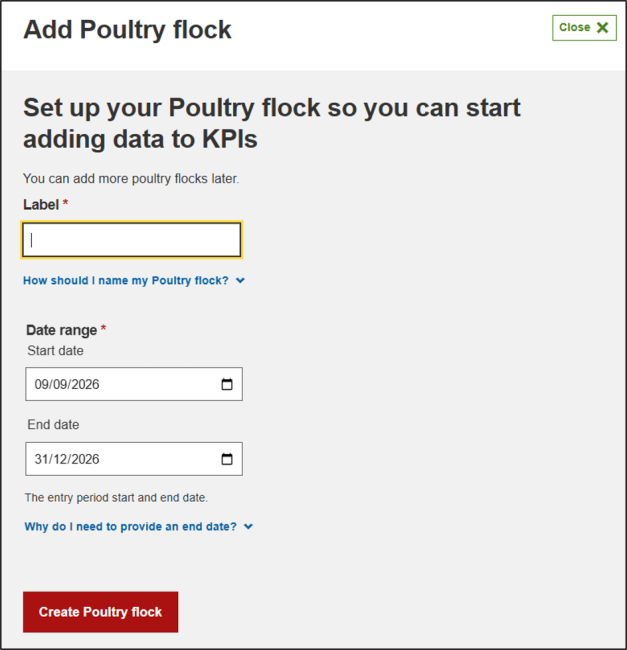
Naming the flock needs to be relatable for the individual flock e.g. Shed 1 end Jun-26 – this allows for easy comparisons between flocks.
Although the dates are flexible, adding the start and end dates allows for clear data comparison when looking back.
Adding additional flocks and managing flocks
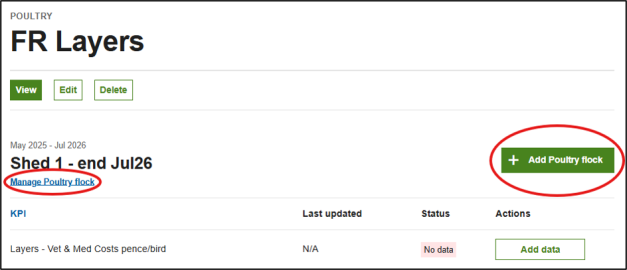
If you have multiple flocks e.g. sheds that are run separately, you can add more flocks, by clicking “+ Add Poultry flock” on the right-hand side
“Manage Poultry flock” allows you to amend the flock details at any point. If you kept a flock longer than expected, you can then extend the end date.
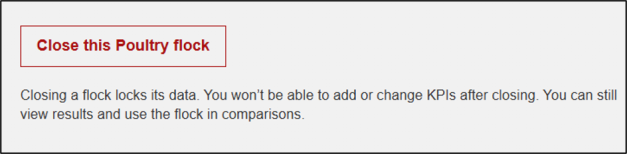
When you have finished the flock and do not wish to complete any further benchmarking on that flock, you can “Close the Poultry flock” by clicking on “Manage Poultry flock” and scrolling below the start and end date fields.
Submitting Poultry KPIs for SFS
This is completed in the same way as other KPIs in the tool. Follow this guide for support.
However, there is a significant difference for Poultry KPIs meaning that once a KPI has been submitted for SFS, you can continue editing the KPI. The minimum number of 6 months data is required in order to submit a KPI for SFS. If you are new to Poultry or you have a Laying flock that spans 3 calendar years, you can still include data in KPIs for SFS but continue benchmarking the total figures for the flock.