

Once you have entered all the data required for a KPI, click Show Results to take you to the results page of a KPI.
The results page includes:
- A graphic and table presenting your results - some KPIs provide you with industry standard comparative data that comes from reputable sources which are detailed on the screen under the graphic. Other KPIs are simply self-comparison KPIs, where you can compare your figures from one year (or one enterprise) to the next.
- An explanation to help understand what the results are telling you.
- Tailored support options - offering KPI related articles, podcasts, training opportunities and more, that may assist in improving your KPI results.
However, KPIs in isolation do not give the whole picture, so reviewing various KPIs together allows you to create a fuller picture of the strengths and areas of improvement of your whole business.
When your results for a specific performance indicator are compared to top third farms in the industry with perhaps above average costs, their higher profits will outweigh these costs.
If you want to seek more support relating to the data from your KPI, then you can contact your Local Development Officer who can guide you on suitable next steps available in Farming Connect to improve your performance in many key areas.
Example of a KPI graphic within the tool:
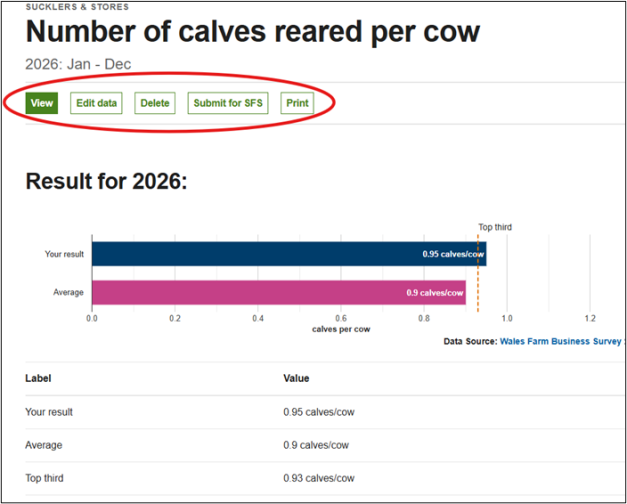
If you think you may have input the data wrong, you are able to go back and Edit data from the results page.
You can also Delete the data input for the KPI, if you want to start again.
You also have the options to Submit for SFS (see the specific guide for this) or Print the results page.
Once you have submitted a KPI for SFS, you can no longer amend the data in the KPI until the next calendar year.
When you have completed the review of a specific KPI result, and do not wish to pursue any further support, you may wish to look at other available KPIs.
You can access other KPIs within your enterprise by clicking the back arrow under the logo.
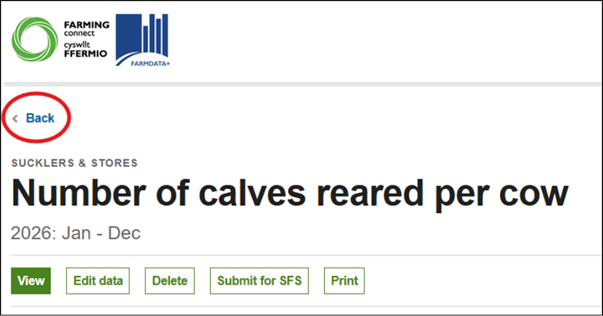
Once you have clicked this button, it will take you back to your enterprise displaying all the KPIs available for that enterprise, giving you the opportunity to select another KPI and complete some more benchmarking.
If you prefer moving onto a different enterprise or looking at the Whole Farm KPIs, then you can access these on the panel on the left-hand side.
If you need to add a new enterprise, firstly select Dashboard on the left of your screen, followed by “+ Add Enterprise” button on the right-hand side of the Dashboard screen