

Selecting a KPI
There are two types of KPIs or Indicators built into the tool, those which align with a specific Sector and those that cover the farm as a whole – these are called Whole Farm KPIs.
Within the Whole Farm KPIs section, there are 3 categories of KPIs:
- Environmental – including indicators relating to Soil health and Woodland, for example
- Farm Overview – these are financial KPIs looking at the farm business as a whole.
- Forage and Grazing – they include various grass production, grazing and maize KPIs
KPIs can be found by clicking on one of the enterprises or one of the Whole Farm KPI sections on the left-hand side. Based on your enterprise setup, associated KPIs will be presented on the screen for you to choose from.
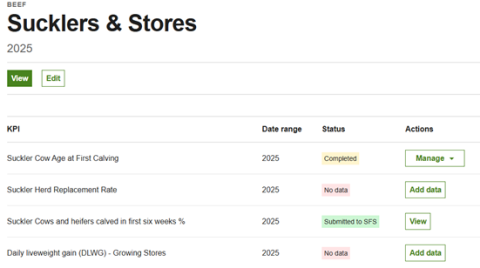
Date range – for all KPIs (except the Poultry-Layer KPIs), these dates will be a fixed calendar year e.g. 2025, 2026 etc. When you are putting data into the KPIs, be mindful to include data that is relevant to the year in question. Best practice would be to capture the data from the same time period each year, e.g. if Scanning happens over December 2025/January 2026, you would want to capture the results in the year 2025 as it relates to your lambing performance in 2026 as well. If you then scanned everything in December 2026, you would want to put the results into the 2027 year for the same reason.
When looking at Farm Overview KPIs (which are based on financial data from your business), it is easiest to take the last financial year's figures so perhaps 31 March, as these will have been calculated for you. However, using the same data year-on-year is most beneficial for self-comparison.
Status – there are 3 statuses that your KPIs could be at:
- No data – this indicates that you haven’t entered any data into this KPI for this Date range
- Completed – this indicates that you have added data to the KPI and have received results on the back of your data entered. You can view the KPI results, and edit the data from the results page if required
- Submitted to SFS – where the KPI has been completed and submitted to RPW for SFS (no data is actually sent across to RPW). You cannot edit these KPIs until next year